Jharbhoomi Lagan: The 2025 Complete Guide to Paying Jharkhand Land Revenue Online
Rita had kept a crumpled lagan receipt tucked in an old file for years. When the bank asked for proof of updated land revenue to process her small farm loan, the paper was unreadable—and the deadline was close. That evening, her son opened the Jharbhoomi portal on a phone and, within minutes, generated a fresh receipt. The panic turned into relief because jharbhoomi lagan can now be paid and verified entirely online.
What is “lagan” and how does Jharbhoomi help?
Lagan is the annual land revenue payable to the state for your holding/plot. In Jharkhand, the state has digitized the experience so you can pay, view dues, and download receipts (raseed) online. The jharbhoomi lagan flow routes you through the State’s land-records ecosystem (Jharbhoomi and its linked services) so you don’t have to visit offices for routine payments or copies. The Finance Department also operates e-GRAS (Government Receipts Accounting System) for online receipts accounting, which underpins many state collections.
The service is part of the Government’s larger DILRMP (Digital India Land Records Modernization Programme) effort in Jharkhand. JharBhuLagan is the state initiative to make land-revenue collection easy and hassle-free, with citizen receipts available online.
The official portals you’ll touch
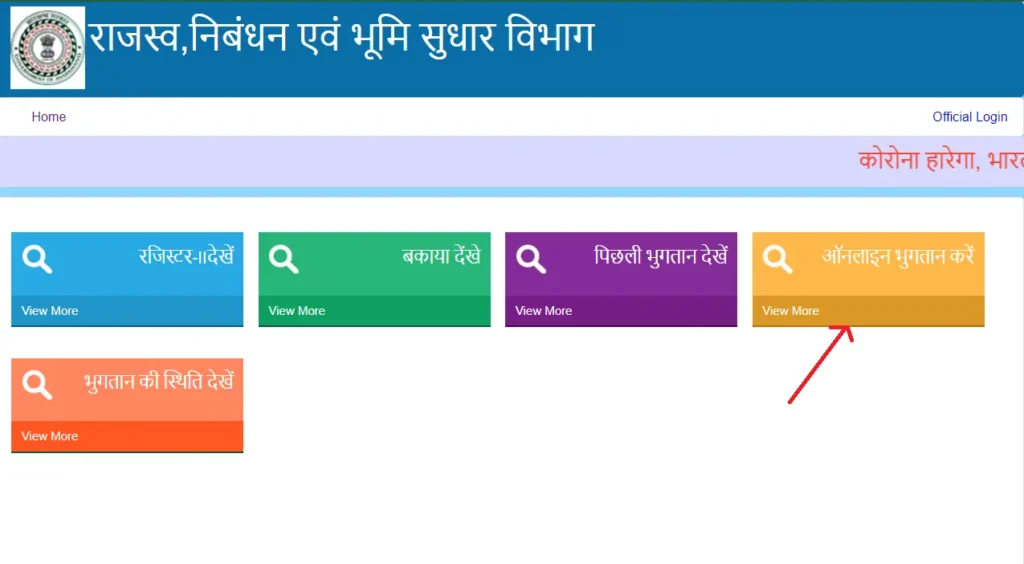
Jharbhoomi — Jharkhand’s Land Records portal. From the home page, you’ll find “Online Lagan” and other land-records utilities (Khatian/RoR, court case data, etc.).
JharBhuLagan — the state’s land-revenue (lagan) payment interface. You’ll often see official instructions and tutorials pointing to this sub-portal for paying and downloading lagan receipts.
e-GRAS (Finance Dept.) — the state’s online receipts accounting backbone; you may be routed through it for the payment stage or backend accounting.
Tip for clarity: Property / Holding Tax (municipal) is separate. If you’re paying house/holding tax inside a municipality, that’s handled on the Jharkhand Municipal portal, not via jharbhoomi lagan.
Before you pay: what you need
Keep these handy:
District → Aanchal (Circle) → Halka → Mauja (Village)
Search key: Khatian (RoR) number, account number, plot number, or raiyat name
Owner details to confirm the record is yours
Payment method: UPI, net banking, debit/credit card (actual options shown on the payment page)
Multiple citizen guides and tutorials describe the same high-level steps: open Jharbhoomi, choose Online Lagan, search by district/identifiers, confirm dues, and pay online, then download the receipt (raseed).
Step-by-step: pay jharbhoomi lagan online (2025)
Open the official Jharbhoomi portal Go to the State’s Land Records site and locate Online Lagan on the homepage. Click to enter the lagan service.
Choose your search path Select: District → Aanchal (Circle) → Halka → Mauja. Then choose a search option such as Khatian (RoR) number, account/khata, plot number, or raiyat name. Enter the captcha and Search.
Verify the result When your land record appears, confirm the owner/raiyat name and click View (or equivalent) to open the details screen and check outstanding dues (bakaya).
Proceed to payment Click Online Payment. You’ll see total lagan and any arrears if applicable. Choose your payment mode (UPI/net banking/card), complete the payment, and wait for the success confirmation page. (Behind the scenes, payments are accounted for in the State’s receipts system.)
Download the Lagan Receipt (Raseed) After success, download/print the receipt. Keep a PDF and printout for banks, mutation, or legal use. Most tutorials demonstrate where the “Download Receipt” button appears in the flow.
Why it’s safe: Start from the official Jharbhoomi site’s Online Lagan entry point; payments are ledgered in the State’s e-receipts stack.
After payment: status, history & reconciliation
Status: If your network drops after paying, revisit the lagan page and search the holding again; your latest payment should reflect.
History: Use the previous payments / receipt option to re-download older raseed (receipts) when needed (for bank loans or buyer due diligence).
Records linkage: The Useful Links section on Jharbhoomi points to transaction history, updated RoR, and court-case data—handy for researchers and buyers conducting land record jharkhand checks.
Troubleshooting common issues and fixes
A) “₹0.00” amount in the rasheed or on-screen
Re-query the holding and ensure you selected the correct circle/halka/mauja, a mismatch can surface the wrong record.
If dues truly are zero, the system may still allow a receipt view for the current year; verify year selection before assuming a glitch. Many tutorials address the “zero amount” confusion rechecking the year or arrears tab usually fixes it.
B) Payment succeeded but receipt didn’t download
Hit Back to Dashboard and use Payment Status/Receipt to re-fetch it.
Check your email/SMS (if asked during payment) for confirmation IDs.
C) Captcha / session timeout
Refresh and retry. Use a modern browser, and avoid opening multiple Jharbhoomi tabs when paying jharbhoomi lagan.
D) Wrong record pulled
Switch search method (e.g., use Khatian instead of name) and confirm owner name before paying.
E) UPI failures
Try net banking or card if UPI times out. If you get charged but the receipt doesn’t appear, wait 30–60 minutes, then recheck status and contact circle office with the transaction reference.
Smart verification: don’t stop at paying jharbhoomi lagan
For owners (keeping documents in order), buyers (due diligence), and researchers (title clarity), take five extra minutes:
Cross-check Khatian / RoR (Record of Rights): Ensure the owner name, khata, plot, area match your deed.
Check Register-II (Panji-II): This ledger outlines rent demand/collection and is a good cross-reference for jharbhoomi lagan history.
Open Bhu-Naksha (JharBhunaksha): Confirm your plot’s spatial footprint matches the record (useful when boundaries are disputed).
Look up revenue/civil court cases: Jharbhoomi’s links help flag disputes early.
Jharkhand’s land-records modernization (DILRMP) also integrates registration, mutation tracking, and court data so you can triangulate your facts before you transact.
Safety first: official only, no agents
Start from the official Jharbhoomi site, then click Online Lagan—avoid third-party payment links shared on social media.
If you need registration-related utilities (document registration, deficit stamp duty, etc.), use the official NGDRS/JharNibandhan environment operated by the Department.
Municipal Holding/Property Tax is different—use the Jharkhand Municipal portal for that.
Use cases: owners, buyers & researchers
Owners: Paying jharbhoomi lagan on time keeps mutation, loans, and valuation processes smooth. Banks often ask for latest rashid as part of the file.
Buyers: Along with sale deed draft checks, confirm lagan clearance, validate Khatian/Registry data, and verify no revenue/civil cases are pending.
Researchers/analysts: The transaction data, RoR updates, and court-case entries on Jharbhoomi provide structured, time-stamped datasets to analyze land trends in land record jharkhand.
Quick checklist
I paid jharbhoomi lagan from the official Jharbhoomi → Online Lagan link.
I verified the owner/raiyat name before paying.
I downloaded and saved the lagan rashid (PDF).
I cross-checked RoR/Khatian, Register-II, and Bhu-Naksha for consistency.
I understand Property/Holding Tax is paid on the Municipal portal, not here.
For complete information and step-by-step guide of Jharbhoomi visit Jharbhoomi Jharkhand
Rita’s story could be anyone’s in Jharkhand. Missed receipts, fading ink, or a rush for a bank NOC these used to halt progress. Today, jharbhoomi lagan lets you pay from your phone, fetch a fresh receipt, and move ahead confidently. When life asks for proof-loan, mutation, or sale,you’ll have it ready. Use the official portals, keep your documents neat, and let your land records work for you, not against you.
Keep the jharbhoomi lagan habit annual, the documents tidy, and your verification routine simple. It saves hours, cuts stress, and protects value today and when it matters most.
Start at the official Jharbhoomi portal and choose Online Lagan; proceed with search and online payment as guided.
No. Lagan is land revenue under the Revenue & Land Reforms Department. Property/Holding Tax is municipal and payable on the Jharkhand Municipal portal.
District → Aanchal → Halka → Mauja, and an identifier like Khatian, account/khata, plot, or raiyat name.
The portal supports common online methods (UPI, net banking, card); exact options appear on the payment gateway screen integrated with the State’s e-receipts system.
Yes, use the receipt/history options after entering your holding details again to fetch previous raseed (receipt)
Verify Khatian/RoR, Register-II, and Bhu-Naksha alignment and scan court-case data from the Jharbhoomi links